

Account-bound live trading
Paper and live states stay visible. Live entry requires explicit authorization bound to the selected broker account.

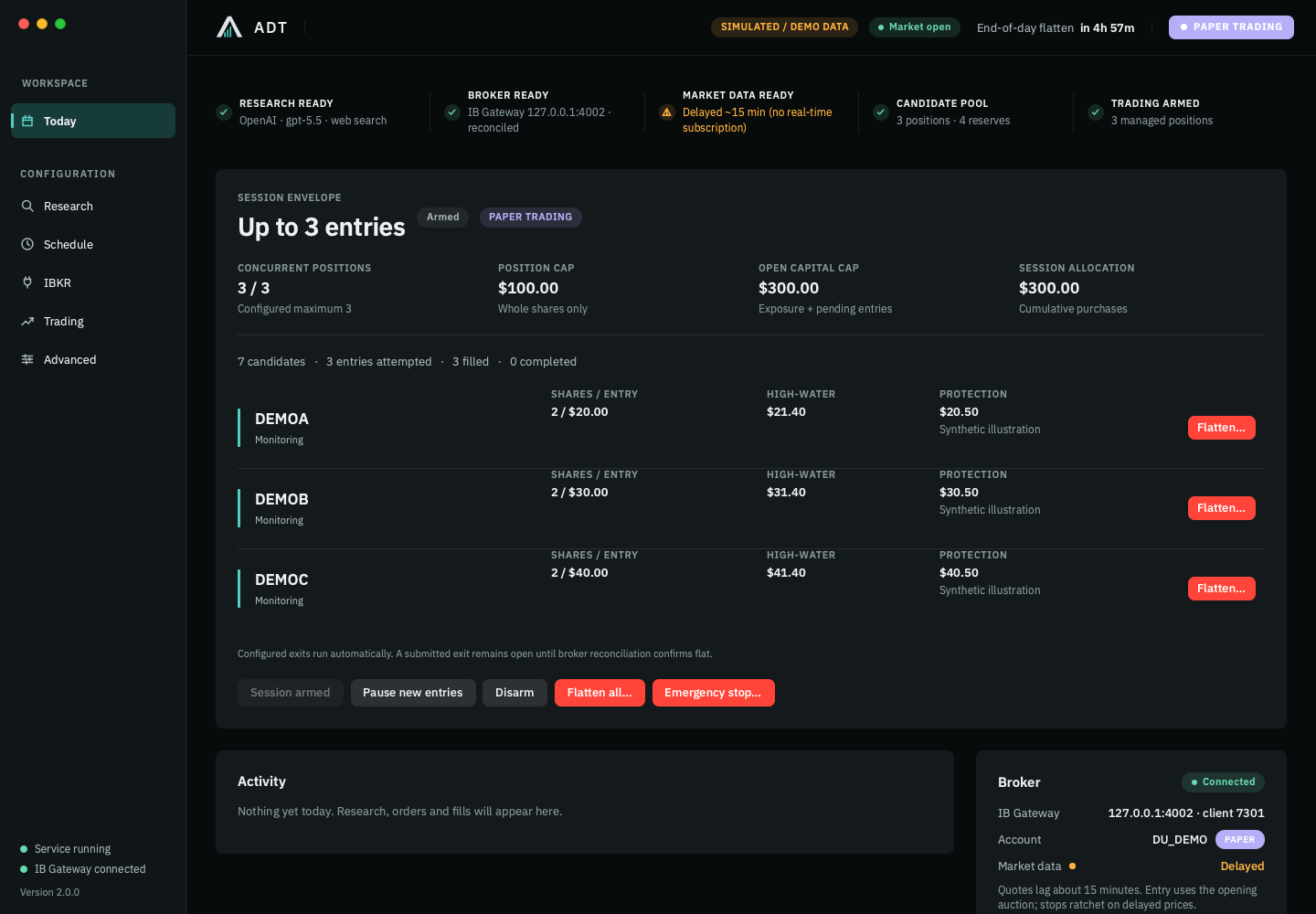
Your limits.
A complete trading lifecycle.
ADT is a desktop trading application with a separate background engine. Research receives your trade count, position cap, capital limits and eligibility rules before building a ranked candidate pool. Each qualifying position has independent entry, protection, automatic exit and broker reconciliation.
Explore the productChoose one entry or a larger session. ADT ranks candidates inside those limits, rechecks each entry and advances to qualified reserves when a candidate becomes unusable. Maximum entries never means a mandatory quota.
Follow the lifecycleSet entry, position, capital and risk limits.
Rank eligible candidates and qualified reserves inside those limits.
Authorize, revalidate and size each whole-share entry.
Independent protection follows each position’s favorable movement.
Configured exits initiate automatically; broker evidence completes the lifecycle.
US equity session timing follows the exchange calendar and America/New_York semantics, including holidays, early closes and DST. The display timezone is configurable.
A deliberate one-entry configuration: follow one fictional position through the application. Larger sessions run independent lifecycles under the same configured envelope.
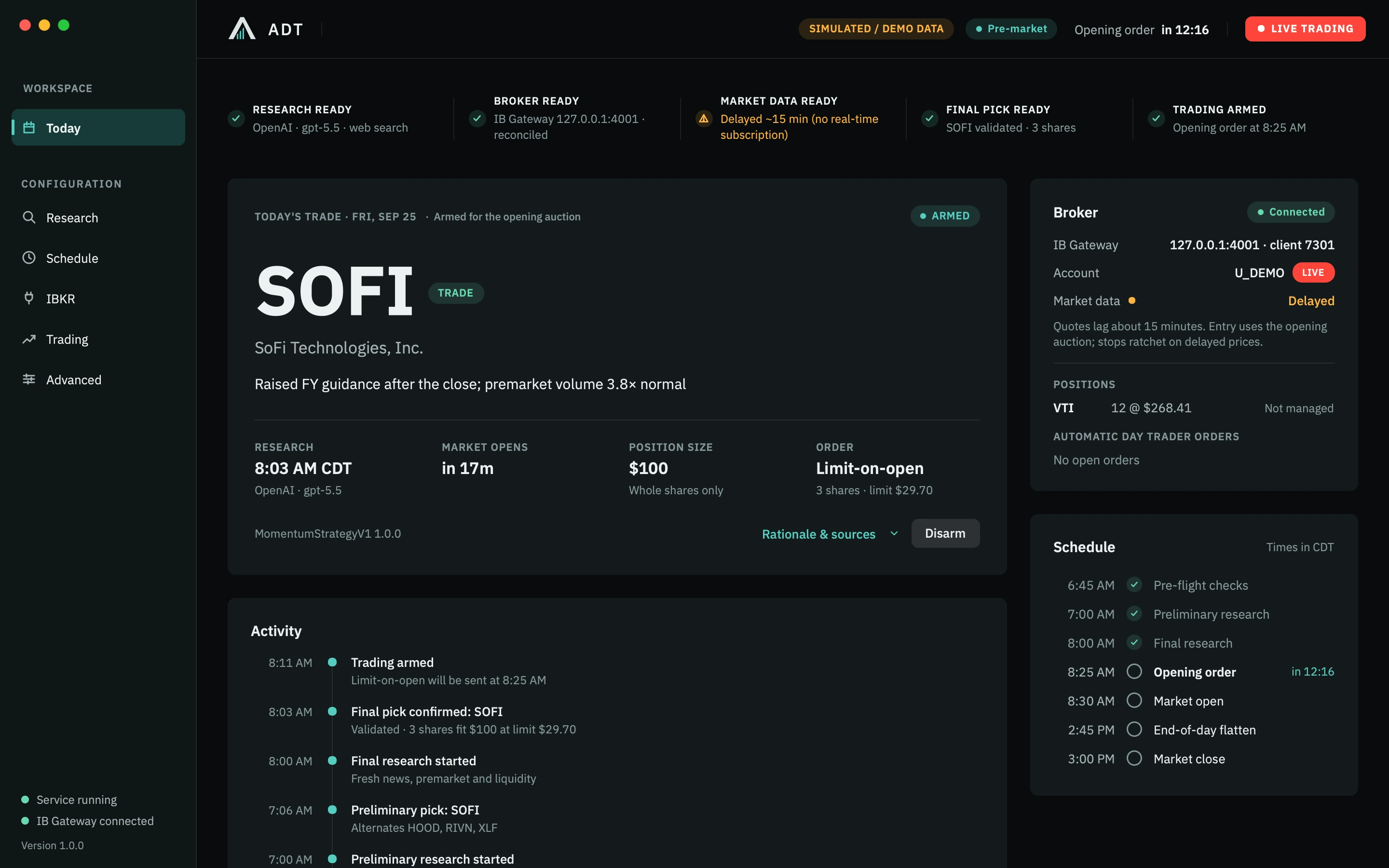
This one-entry configuration has selected SOFI. The dashboard shows the catalyst, $100 position budget and a limit-on-open order for 3 whole shares. Rationale & sources opens the supporting research.
Configured exits are automatic. Manual flatten is an operator override; live authorization remains explicit.
Explore the trading controlsThe session saves its operating envelope and ranked research. Independent position lifecycles apply the versioned strategy, exchange calendar and broker updates without further model calls for monitoring or exits.
Inside the execution engineRead the account mode. Inspect the broker state. Understand what is protecting the position. Keep the controls within reach.
Review the safeguardsPaper and live states stay visible. Live entry requires explicit authorization bound to the selected broker account.
After startup or reconnect, the engine compares its records with broker positions, orders and fills before resuming.
ADT initiates protective and session exits itself, then reconciles until the broker confirms flat. Manual flatten remains an override; execution depends on market and broker conditions.
The desktop is your control surface. A separate local service manages the session. Interactive Brokers remains the authority for actual positions and executions.
A native PySide6/QML client displays service snapshots and submits explicit commands over local authenticated IPC. Closing the window does not stop the trading service.
Research receives the session envelope before ranking candidates. Qualified reserves are retained without relaxing selection criteria. Current broker and market checks run before each entry.
A single writer serializes aggregate reservations and order decisions. Each position has independent order IDs, high-water mark, protection and exit state. Intent is recorded before submission.
The official TWS API sends orders and receives broker events. Login stays in the broker’s software. A disconnect triggers reconnect and reconciliation.
Decisions, orders, executions and state transitions persist locally. Broker positions and fills are reconciled against that record. Logs and reports support inspection.
The software runs on your computer. You authenticate directly in IB Gateway or Trader Workstation and configure your research provider. Closing the interface leaves the background service running.
This is an operated system. Your computer, gateway, network, data permissions and broker account must be ready for the session.
Read the operator guideMac and Windows desktop software, guided installation, a paper-account walkthrough, ongoing updates and technical support. All prices in USD.
Guided rollout. We confirm compatibility, availability and written purchase terms before payment. Requesting access does not start a subscription.
Setup is charged once. Taxes, if applicable, and third-party costs are additional and disclosed before purchase.
Practical explanations of the software, the broker connection and the responsibilities around an automated trading session.
Research, orders, fills, protection and the operating model behind them.
Gateway and TWS configuration, paper mode, data permissions and recovery.
A paper-testing checklist that includes interruptions and unfilled orders.
Automatic Day Trader is configurable desktop trading software. You set the session envelope and authorize the account; research ranks eligible candidates within those limits, and independent position lifecycles manage entries, protection, configured automatic exits and broker-confirmed flat.
No. Trading can lose money, including more than the intended stop distance because of gaps, slippage, halts, liquidity or execution failures. Automation and deterministic rules do not make a strategy profitable. No simulated example on this site is a verified live track record.
ADT Desktop is built for Mac and Windows. Mac builds target Apple silicon on macOS 13 or later; the Windows package targets Intel/AMD x64. A separate local background service manages the session when the interface is closed. Windows is currently a testing release, requiring target-machine and paper broker-lifecycle validation before operational use. The computer and broker gateway must remain available.
Yes. You configure the research provider, broker connection, schedule and strategy parameters. Live trading requires an explicit account-bound authorization. Pause entries, disarm, Flatten Position, Flatten All and Emergency Stop remain available as overrides. Normal configured exits are automatic; all exits remain subject to broker acceptance and market execution.
The implemented broker integration connects to Interactive Brokers through a locally running IB Gateway or Trader Workstation using the official TWS API. No Public.com integration is offered. Compatibility does not imply a partnership or endorsement.
Explore the package, review your requirements and request guided access to ADT.