ADT checks the account, session and broker state before entry, then autonomously manages configured protection and exits for each position through broker-confirmed flat. The controls below describe the current implementation and its operating limits.
Operator controls
Confirm the account. Confirm the action.
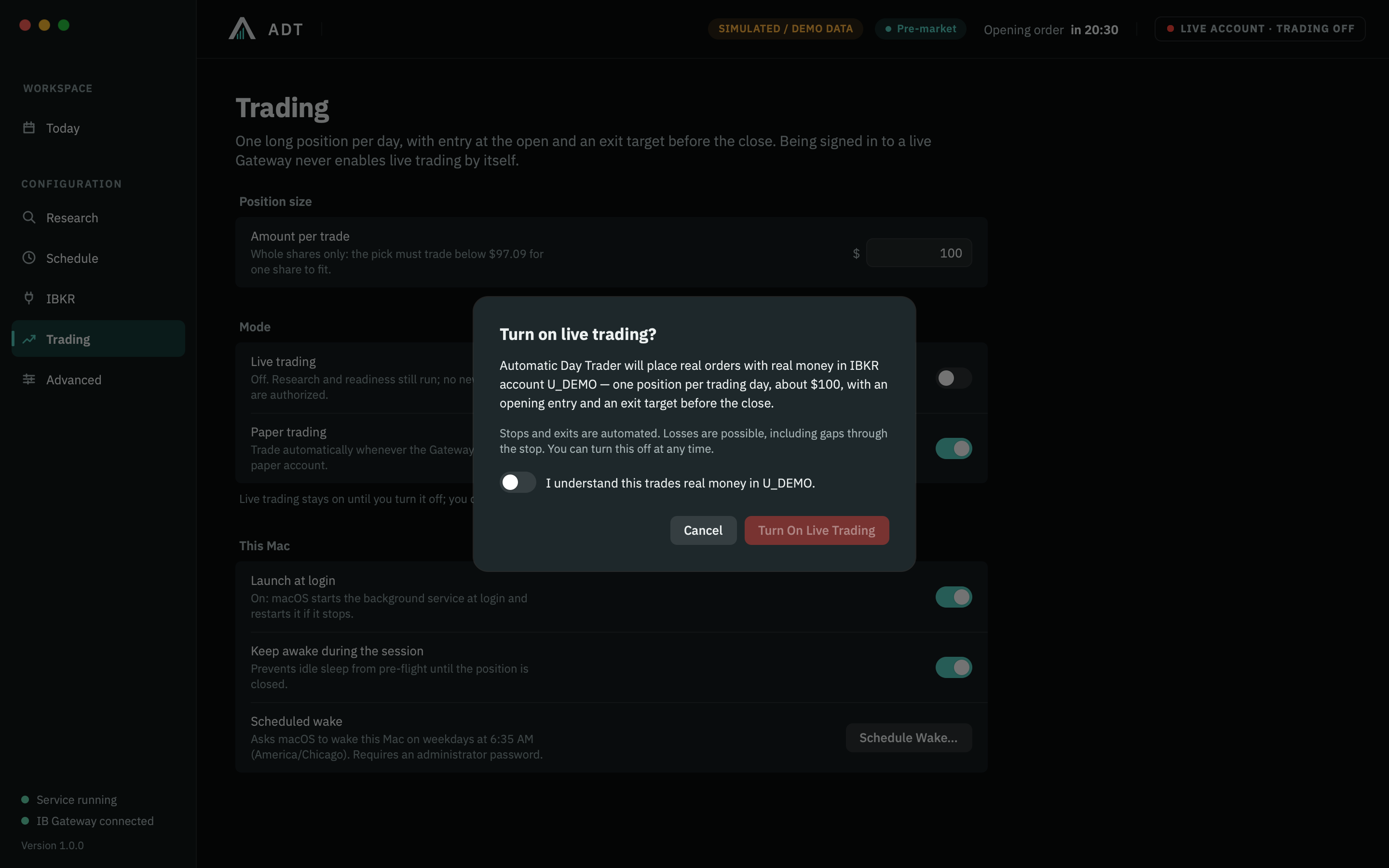
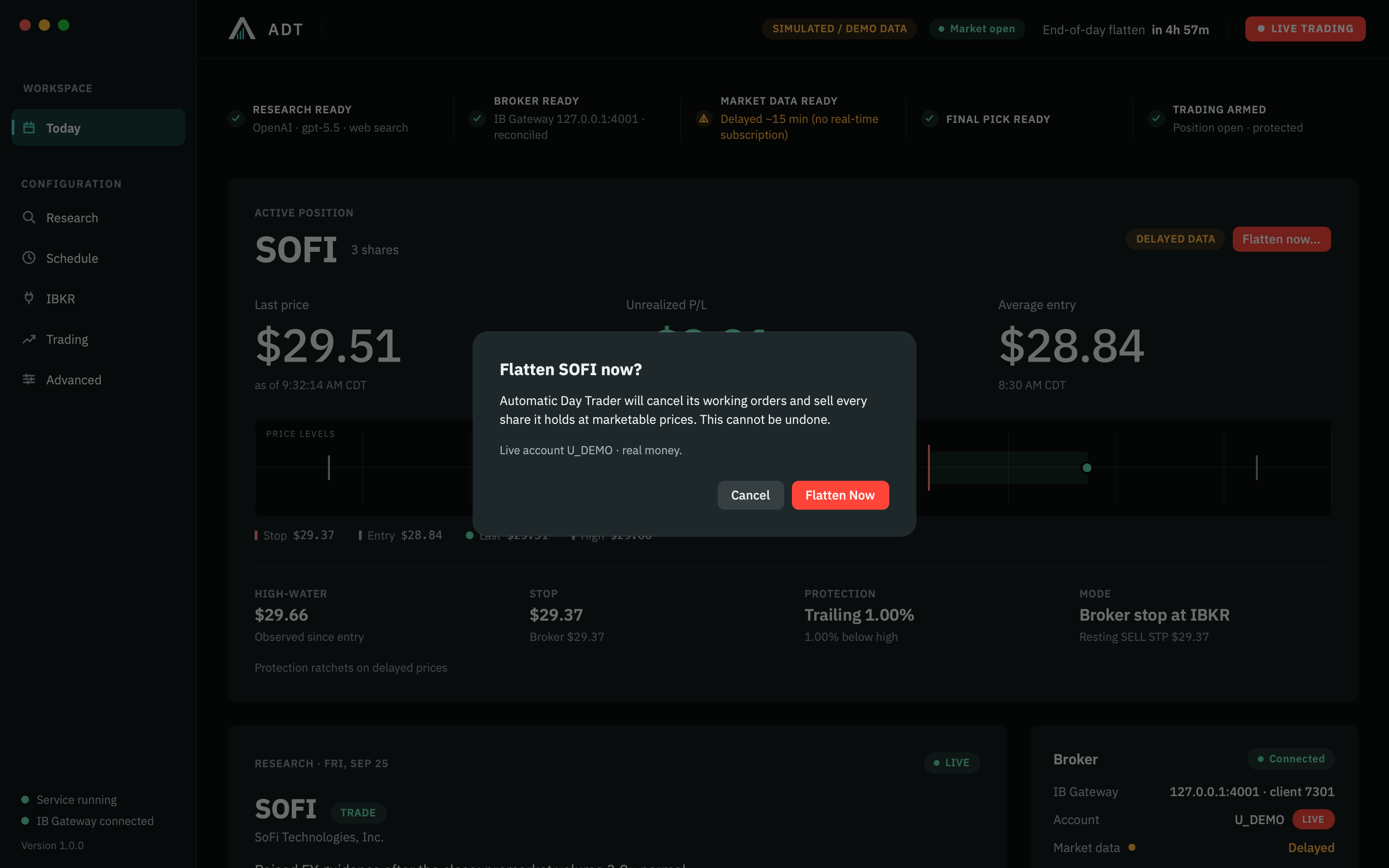
Separate confirmation screens keep authorization and manual intervention explicit. These isolated captures illustrate a one-position configuration; the current session ledger also supports per-position and all-position overrides.
Simulated / Demo Data
Enable live trading
In Trading settings, turn on Live trading. The confirmation identifies the account and position budget. Acknowledge the real-money warning before selecting Turn On Live Trading. The setting stays on until you turn it off.
Configured exits are automatic. To intervene, use Flatten Position or Flatten All and confirm the action. The same exit/reconciliation system handles the override until broker-confirmed flat. This capture illustrates the one-position control.
Per-position notional, aggregate open capital, cumulative session allocation, available funds, entry count and concurrency are checked together.
Operating limitA spending cap is not a maximum-loss guarantee. Broker/data capacity and entry timing may lower actual participation.
Observed-loss circuit breaker
An optional configured session-loss threshold pauses new entries and initiates managed exits when available realized and quoted unrealized values breach it.
Operating limitMissing or delayed quotes, gaps, slippage and exit delays can make the final loss larger. This is not a guaranteed portfolio loss cap.
Paper / live separation
Separate settings and a persistent account-mode badge. Live entry requires explicit authorization for the exact broker account.
Operating limitOperator authorization does not remove trading risk.
Operating limitA limit can prevent a fill. Data quality and broker permissions still matter.
Duplicate-order defenses
State gating, a single service lock, unique order records, tagged orders and execution de-duplication.
Operating limitBroker reconciliation is required after interruption; unexpected broker state may block operation.
Position protection
Configured broker-side stop and market-on-close backstop; price-driven stop ratchets never loosen under the strategy.
Operating limitStop prices do not guarantee execution prices. Protection must be accepted by the broker.
Scheduled exit
The engine automatically initiates its configured exit before the actual exchange close and continues its reconciliation and retry process.
Operating limitHalts, disconnects or rejection can leave a position open overnight.
Operator intervention
Pause new entries, disarm, flatten one position, flatten all, emergency stop, resolve an error and inspect broker state.
Operating limitFlattening submits an exit request. It is not an immediate or guaranteed liquidation.
Know the protection mode
Broker-held and app-monitored protection
The dashboard identifies the protection authority. A resting, accepted broker stop can operate without the UI. App-monitored protection depends on the service receiving data and remaining connected.
Verify actual orders in IBKR when connectivity or protection is uncertain. A green connection indicator alone is not proof of an accepted stop.
Before enabling live trading
Rehearse the operating procedure.
Use a paper account. Confirm mode and account, understand delayed versus real-time data, review strategy settings, and practice the recovery procedure. Read the trading risk disclosure before requesting live access.
Session spending and optional observed-loss controls constrain engine behavior. They cannot guarantee a maximum loss, stop fill, uninterrupted availability or flatness during a halt or outage.
Automatic exit mechanics
Let favorable movement continue. Advance the protection.
Profit-protection activation raises a protective threshold. It does not impose a fixed take-profit ceiling. Actual fills depend on broker acceptance, liquidity and the available price.
01
Entry confirmed
Broker fills establish the quantity and average entry.
02
Initial protection
The configured downside stop protects confirmed exposure.
03
Favorable movement
Each position records its own high-water mark.
04
Profit protection activates
The threshold advances protection; the position can keep running.
05
Protection ratchets
A higher peak can raise the stop. A pullback does not lower the recorded high or loosen the threshold.
06
Configured exit triggers
A reversal through protection, the session deadline or an enabled observed-loss condition initiates the exit.
07
Broker confirms flat
ADT reconciles fills, position quantity and remaining orders before marking the lifecycle complete.
Mechanics, not a performance example. The recommended preset is provisional and retains existing thresholds after synthetic scenario evaluation. Read the values, evidence and limitations.
A closer look
Ask about ADT and your setup.
Explore the package, review your requirements and request guided access to ADT.